Season analysis
Overview, attack, defense, players, plays — your season in numbers.
Under Analysis, SportsFlow rolls up every tracked match into season stats — no Excel needed.
Prerequisite
At least one tracked match in the selected season. Otherwise the app shows a friendly nudge: track a match first.
Choose a season
At the top, you switch between a single season and "All seasons" (all-time), plus the match type: Competitive only (league and cup), Competitive + friendlies, or All (incl. training). Training only counts when you explicitly add it.
The default is the current season. As long as no competitive match has been played in it, friendlies count; from the first played competitive match on, SportsFlow shows competitive matches only. The same rule applies to the record on the home screen, the match list and the player profile.
The tabs
Analysis is organised into tabs. Each answers a different question:
| Tab | What you see | Question |
|---|---|---|
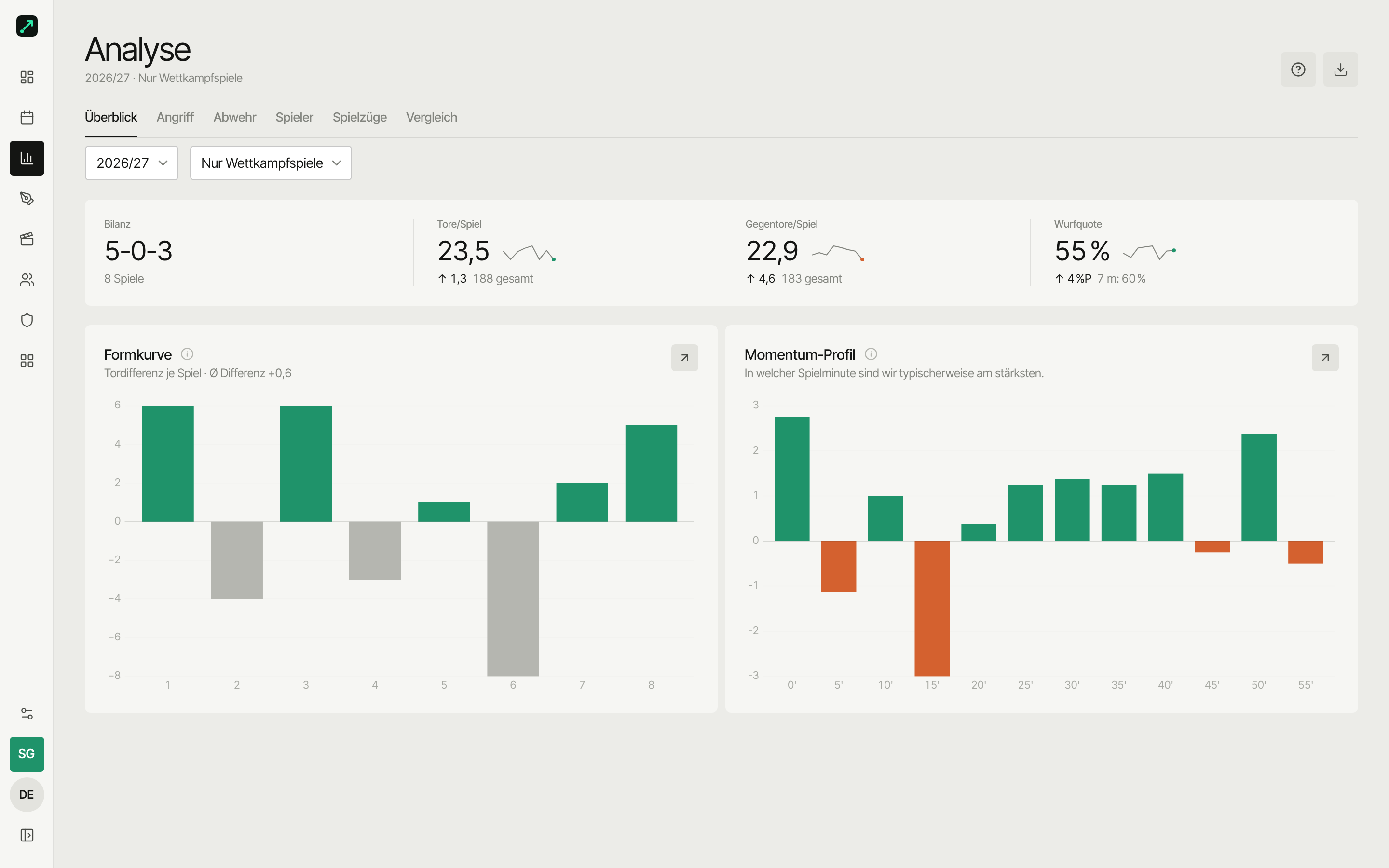
| Overview | Record KPIs, form curve, momentum profile | How are we doing overall, and how are we developing? |
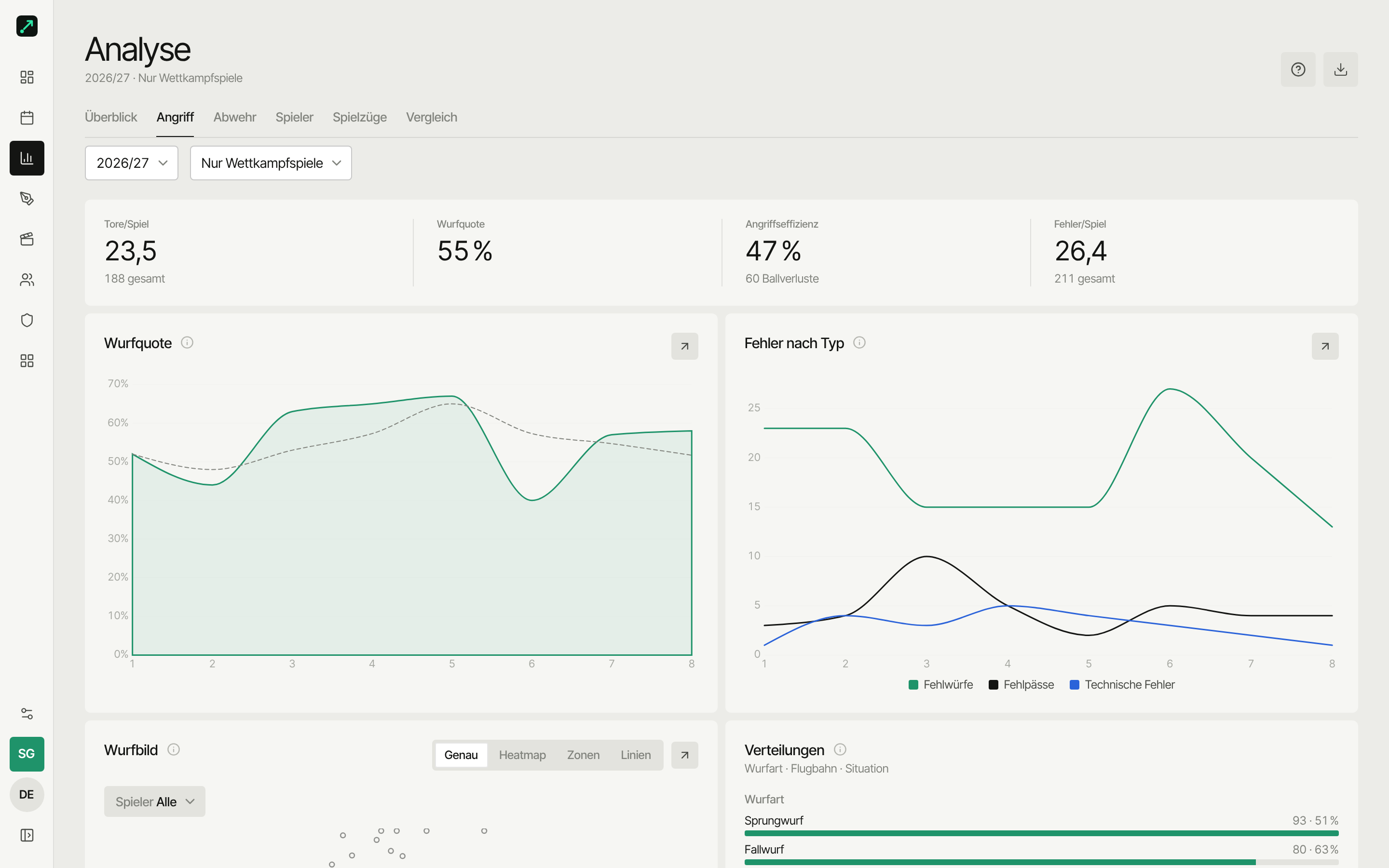
| Attack | Shot charts, rate trend, position breakdown, assists, errors, distance & special phases | From where do we shoot, and how successfully? |
| Defense | Opponent goal pattern, defense efficiency, save rate, goalkeeper, defensive actions | What does our defense allow? |
| Players | Player impact table | Who's carrying the team? |
| Plays | Fast breaks, play effectiveness, play usage | Which trigger or play delivers? |
| Compare | Line players up side by side | Who's better at what? |
Overview
- Record — wins, draws, losses, goals for/against, difference per match.
- Form curve — goal difference match by match, as a trend instead of a wall of numbers.
- Momentum profile — which match minute your momentum is typically highest or lowest across the season.
Attack
- Shot charts — heatmap: from where you shoot and score. On the web and iPad at half width, with the breakdown by shot type, trajectory and situation beside it.
- Attack development — shot rate as a season trend.
- Position breakdown — per position (goalkeeper, wing, back court, pivot …): shots, rate, turnovers, defense, stability.
- Assist combinations — top assist-makers and the best assist pairings.
- Errors — turnovers and missed shots across the season, plus errors by type as a trend per match.
- Distance & special phases — efficiency by shot distance and power play / short-handed from real strength windows (6v5, 6v4 …), including a weak-point analysis when short-handed: from where/to where you concede and who makes the errors.
How the windows and rates are calculated is explained in the metrics glossary.
Defense
Defense numbers come from what you've tracked on the opponent's side.
- Opponent goal pattern — where the opponent finishes and scores against you. On the web and iPad at half width, with goalkeeper and defensive actions beside it.
- Defense development — defense efficiency as a team KPI and trend per match, plus save rate and goals conceded per match.
- Goalkeeper — saves, goals conceded, save rate. The three-way shot outcome (missed / saved / goal) per goalkeeper shows up in player profile and goalkeeper comparison; live, it's available — including for the opponent's goalkeeper — in live analysis. On top of that, here, in goalkeeper comparison, and in live analysis' halftime overview, you get goal pattern saved/goal per zone — a rate per zone and shot type, not just the total.
- Defensive actions — blocks, turnovers won and more, across the season.
Opponent data is only ever as good as what got tracked at the sideline. If you only track your own shots, defense efficiency and the defense view stay correspondingly thin.
Players
The player impact table ranks the roster by impact: goals, shot rate, assists, defensive actions, impact and more. What the metrics mean is explained in the metrics glossary.
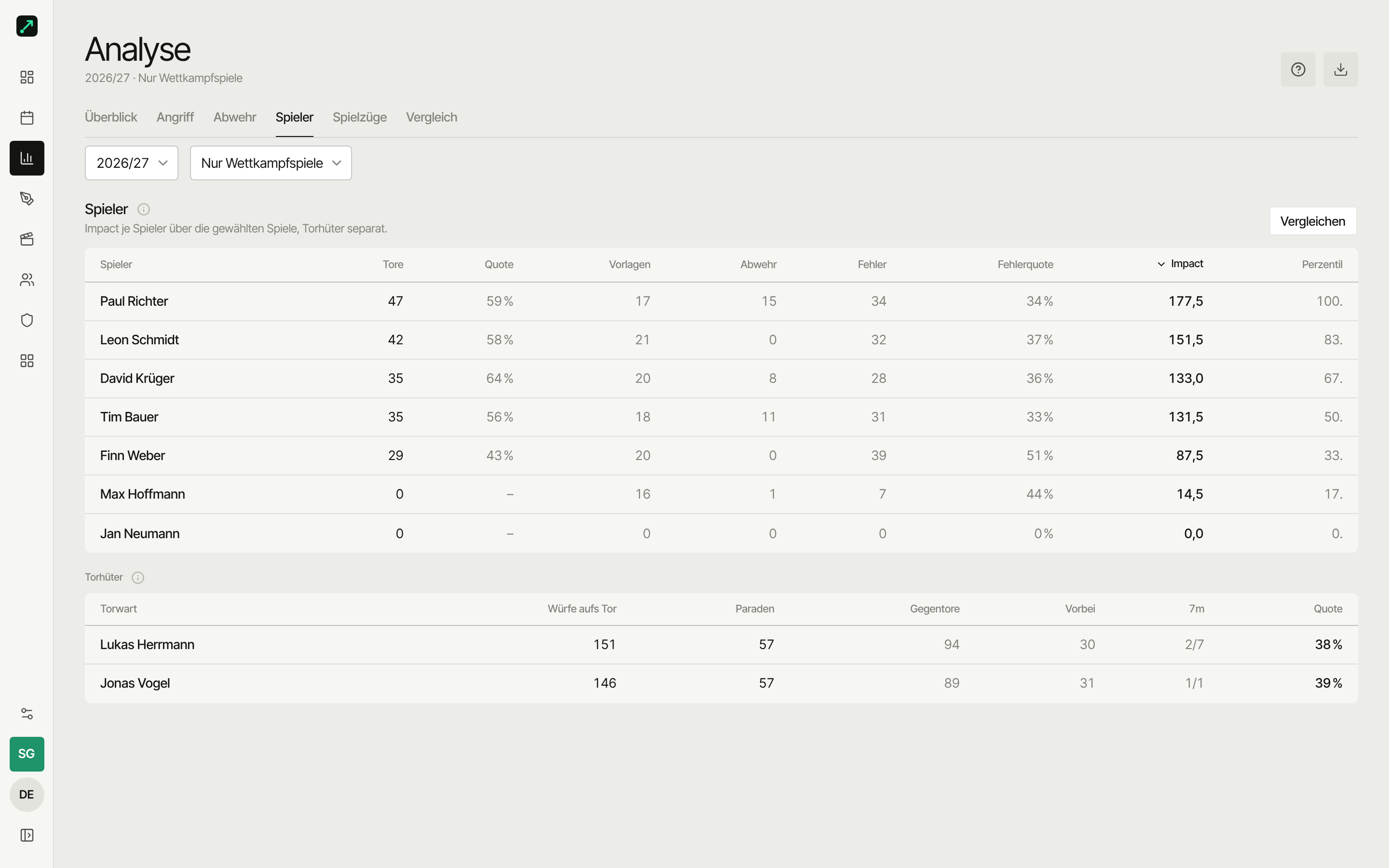
Players with a linked account are highlighted in the table and see their own performance first on the Overview tab. Everything about a single player — metrics, trends, shot chart — is in the player profile.
Plays
- Fast breaks — goals and rate by wave (1st, 2nd, 3rd) across the season, with the most common follow-up actions.
- Play effectiveness — how often each play leads to a goal, and what follows it.
- Play usage — how often you triggered plays in each match, stacked by goal, no goal and no finish. For all plays or one you pick.
Compare
Line up two to six players side by side — radar, trends, shot charts, metrics. Its own guide: Compare players.
A single match
This page aggregates the whole season. For a single match (match flow, lineup, playing time), open the match directly → Match analysis.
Sharing & export
In the page header, the Export menu starts "All matches as CSV (ZIP)" or "Report as PDF" — the current selection (season, match types) is applied. You export a single match directly on the match page. Export is part of the paid plans. Details under Sharing & export.
Plans
- Starter: basic breakdown
- Team season / Pro: full depth
At the limit, the app shows an upgrade prompt.