Opponents
Opponent teams, opponent rosters and shooter profiles — org-private, never shared.
Under Opponents, SportsFlow collects what you know about your opponents: opponent teams, their rosters and a shooter profile per shooter.
Opponent teams appear along the way
You never create an opponent team "new" yourself — it appears along the way:
- During a schedule import, from the fixture list
- When you manually create a match, in the Opponent field — the combobox suggests opponent teams you already know, and typing a new name creates a new opponent team
The list shows the columns Observations, Our matches (your own matches against that team), Roster and Last match next to each opponent team. Observations are other teams' matches, so they're counted separately.
Merge opponents
If the import spells the name differently than your manual entry ("SG Musterstadt" instead of "SG Musterstadt II"), the opponent ends up twice in the list. Under Opponents:
- Mark the affected rows with multi-select
- Choose Merge, pick which one stays
- Confirm — matches, roster and shooter profiles move to the remaining opponent team
Three tabs per opponent
An opponent's page has three tabs, with the season switch above them:
| Tab | What's in it | Source |
|---|---|---|
| Roster | Number, name, position, throwing hand, shots (observations), last observation | Observations + import |
| Attack | How the team attacks as a whole, without player detail | Only your matches against this team |
| Shooter profiles | One shooter profile per shooter, plus the list of observations | Only observations (+ imported goals) |
Opponent roster
In the Roster tab you maintain the opponent's players:
| Field | Note |
|---|---|
| Number | Required |
| Name | Optional |
| Position | Optional |
| Throwing hand | Optional |
| Note | Free text |
Numbers and names from the lineup of a match-report import land in the roster on import, as does every number you newly tap in an observation — you never have to type them out. The import never overwrites a name you've already entered, it only fills an empty name field.
Only for your team
The opponent roster is org-private: it never appears in the public match link and is never shared with other teams. Only you see what you note about an opponent. A paired match doesn't change that either: it only brings the opponent's shots to you — names only if they switch on Send player names.
Import a match report
"Import match report" brings in finished matches of a team against a third party — e.g. several matchdays of your next opponent at once. A coach/staff thing, two entry points, same flow, the team is already set in both cases:
- Opponent page, Shooter profiles tab, Observations section, Add observation → Import match
- The preparation of your own match against this opponent, Add observation → Import match — imported matches are linked to the preparation right away, matches already imported are simply added
Steps:
- Search for the club and team (like in the schedule import)
- Tick matches from the fixture list — matches already imported or cancelled ones are greyed out
- Import — each match becomes an observation
Only ticker data gets imported (goals, 7m throws, 2-minute suspensions, timeouts) — no shot positions. Numbers and names from the observed side's lineup land in the opponent roster on import — visible to your team only, and a name you already entered stays unchanged. handball.net supplies the lineup, Handball4All doesn't — there only the numbers from the ticker land, without names. Importing the same matches a second time doesn't create duplicates.
Large selections run in batches of ten matches; the counter ("3 of 24 matches imported") keeps up as it goes. If a batch aborts, everything already imported stays put — just start the import again, matches already fetched get skipped.
Missing shot chart?
Goals from the import count in the shooter profile, but without a shot location — the note "Shot chart missing — add from video" shows exactly that. If you later observe a match of this team yourself, the shot locations get added.
Reading a shooter profile
In the Shooter profiles tab (from the Team plan) you get a quick read per shooter. Shooter profiles come exclusively from observations — in your own match, SportsFlow never asks for the opponent's jersey number.
At the top of the page there's the "Report as PDF" button → /druck/steckbriefe/$teamId: an "All shooters" sheet plus one page per shooter with a coach note — for staff and players alike. More on PDFs, stories and CSV: Sharing & export.
At the top of the tab there's therefore the Observations section: every row reads "Observation · Team A vs. Team B" with the date and the number of recorded shots below it (or "not recorded yet"). Next to it the "Add observation" button — the same flow as in the preparation: Import match first (coaches/staff only), otherwise Create manually (coaches/staff and goalkeepers with a linked roster player, goalkeeper position). A preparation of one of your matches only holds the observations you link there; the ones not linked yet are suggested under Already there. If there's nothing there yet, there's no shooter profile yet either.
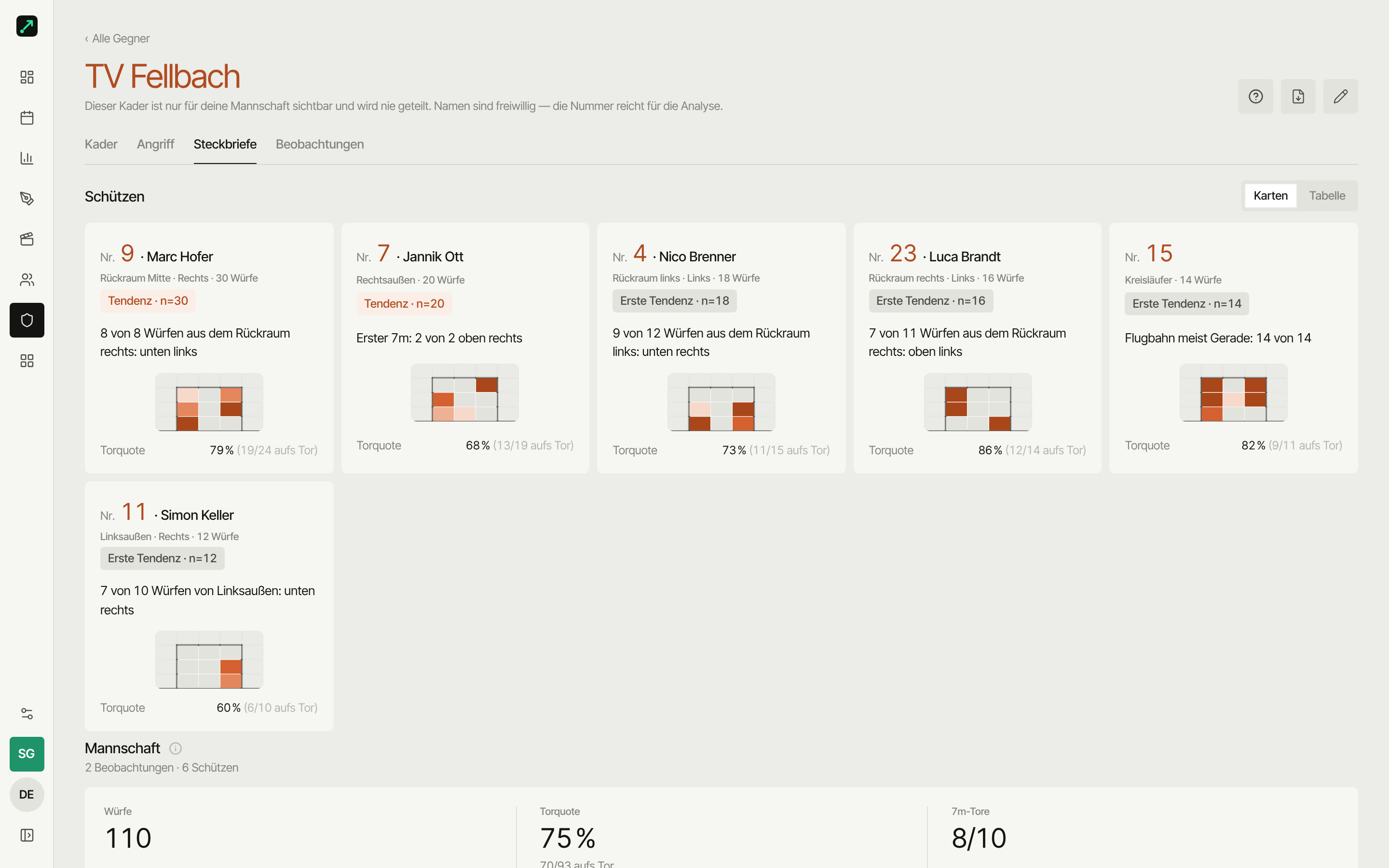
The card shows number, name, recorded shots, the sample-size badge and the strongest sentence. The detail view shows:
- Top-3 facts as sentences — e.g. favourite corner, 7m corner, preferred shot type, and from two observations also "First 7m: n of m <corner>". These need at least 4 shots with at least 60% share (3 is enough for 7m throws; the first 7m needs two observations with at least 60% in one corner)
- Shot chart with the ShotViews modes exact, heatmap, zones (tap to filter by zone) and lines, each only with data; if there's not a single shot location, the plain numbers show instead — "12 shots, 6 goals". Shooters for whom only match-report goals exist show as "5 goals from match report"
- Goal pattern saved/goal, 7m corner and shot type
- First 7m next to All 7m: two small goal heatmaps — for each observation, only the shooter's first 7m throw counts, since most shooters throw it the same way every time and only vary afterwards. In the observation it's marked with the "1st 7m" badge. Feints aren't recorded yet
- Scenes of No. X — every video scene where the shooter is marked under Involved (set in the video studio); players only see shared scenes that aren't "Coaches only"
- Coach note — your own assessment, with the "for players" toggle; it only becomes visible with the toggle, otherwise it stays internal
A sample-size badge shows how reliable the shooter profile is: under 5 shots "too few", 5–19 "early trend", from 20 "trend". Goals from the import without a goal pattern count as goals, but don't feed into any rate.
Team — all observations in one picture
Above the shooter profile cards sits the Team block: all observations of this opponent in one picture, filtered by the same season switch as the tab.
- Metrics: shots, goal rate (goals / shots on goal), 7m rate
- Comparison table of all shooters side by side, sortable (e.g. by shots or rate) — clicking a row opens the shooter profile
- Shot chart and goal pattern saved/goal across all observations
- Shot type and trajectory as a table
A compact version of the same comparison table also sits in the preparation for the next match — there from two recorded shooters, without metrics and charts, just for a quick comparison before kickoff.
How the opponent attacks
The Attack tab (from the Team plan) shows how the opponent team attacks as a whole — only from your matches against this team and without any player detail. A match only counts after full time; who threw is in the shooter profile.
- Metrics: shots, goal rate, 7m goals, fast-break share, turnovers per match
- Shot distribution by zone; if there's no recorded shot location, the plain numbers show instead
- Sources: your matches against this team, listed individually with date and final score — a click opens the match. Observations don't appear here, only in the Shooter profiles tab
Shooter profiles for players
Shooter profiles land automatically in the preparation for the next match against this opponent — you don't need a separate share for that. Goalkeeper and field players see the same shooter profiles, only the order differs: for the goalkeeper they come right after the matchday roster, for field players after "Your scenes", the scenes by tag and the plays. On mobile you swipe between the shooter profile cards. Jersey numbers and shot data are always shared, notes never without the "for players" toggle — names only if they're in the opponent roster (entered or imported from the match report).
The goalkeeper doesn't even wait for the preparation to be published: while the folder is still a draft, they already see the observations and the shooter profiles — everything else (video, scenes, plays) stays closed until it's published. Field players see nothing in an unpublished preparation.
Next
- Observations — scout another team's match; the source of every shooter profile
- Live tracking — the tracking flow in your own match
- Roster — your own roster, for comparison
- Preparation — link observations, cut scenes and mark shooters under Involved